Every designer knows the struggle: you need the perfect image for a project—whether it’s for a website banner, a social media post, or a client presentation—but most images you find online are copyrighted. Using them without permission can lead to takedown notices, demonetization, or even legal problems.
Thankfully, Google provides a powerful and often overlooked solution: Creative Commons licensed images. With the right search settings, designers can access quality images that are free, safe, and legal to use for personal or commercial projects.
This comprehensive guide will show you how to search, filter, and properly use CC-licensed images from Google the right way—so you never have to risk copyright violations again.
⭐ What Exactly Is “Creative Commons”?
Creative Commons (CC) is a licensing system that allows creators to share their work with different levels of permissions.
Some images can be:
Used for free
Modified freely
Used commercially
Used with attribution
Used without attribution
Knowing how to check the license type is essential before using any image.
🔥 Why You Should Avoid Random Google Images
Most images on Google Images are:
❌ Copyrighted
❌ Require paid licensing
❌ Not allowed for editing
❌ Not allowed for commercial use
Using them without permission can result in:
Copyright strikes
Content bans
DMCA takedown
Legal claims
Loss of client trust
That’s why the Creative Commons filter is the safest choice.
✔ How to Find Free, Legal Images on Google (Step-by-Step)
Step 1: Open Google Images
Go to: images.google.com
Step 2: Type the image you need
Example:
“modern office background”
“healthy food flatlay”
“coffee shop interior”
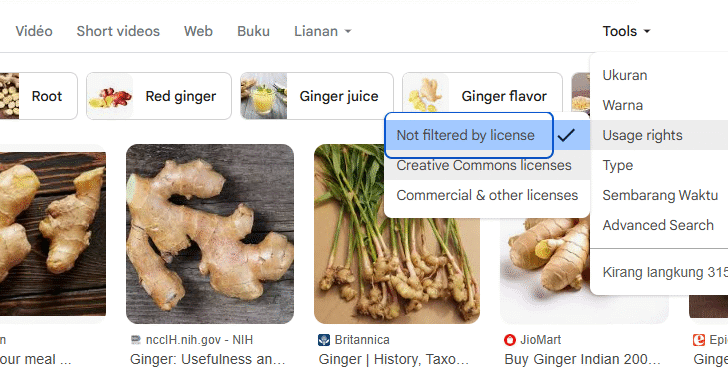
Step 3: Click “Tools”
This reveals advanced filters.
Step 4: Open the “Usage Rights” menu
Here you will see options like:
Creative Commons licenses
Commercial & other licenses
Choose Creative Commons licenses.
Step 5: Visit the source page
Never download directly from Google’s preview.
Always click through to the original website to confirm licensing details.
🎯 Understanding Creative Commons License Types
1. CC0 – Public Domain (BEST FOR DESIGNERS)
✔ Free
✔ Commercial use
✔ No attribution
✔ Modify, repurpose, edit
Use anywhere without restrictions.
2. CC BY – Attribution Required
✔ Free to use
✔ Commercial allowed
✔ Edits allowed
❗ Must credit the original creator
3. CC BY-SA – Share Alike
✔ Free
✔ Commercial allowed
✔ Edits allowed
❗ Must credit
❗ Must share your edits with same license
4. CC BY-NC – Non-Commercial
✔ Free
❌ Cannot be used for commercial projects
(ads, marketing, client work)
5. CC BY-ND – No Derivatives
✔ Free
✔ Commercial allowed
❗ No editing or modifying the image
🧠 Tips to Use Google Images Safely & Legally
1. Always verify the original website
Even if Google marks it as CC, the final decision comes from the hosting website.
2. Avoid images from Pinterest
Many CC-tagged images on Pinterest are incorrectly labeled.
3. Prefer trusted CC-friendly websites
Such as:
Wikimedia Commons
Flickr (CC filtered)
Pexels
Unsplash (not CC, but free-use)
4. If attribution is required, do it properly
Use this format:
Photo by [Name] / CC BY 4.0
5. Save a screenshot of the license page
Helps protect you later.
📌 Best Uses for Google Creative Commons Images
For designers:
Website mockups
UI/UX projects
Social media visuals
Posters and flyers
Blog illustrations
Presentations
For content creators:
YouTube thumbnails
Reels & TikTok backgrounds
Podcast artwork
For businesses:
Ads
Landing pages
Brochures
Corporate branding
(Make sure to avoid Non-Commercial licenses.)
🚫 Common Mistakes Designers Make (Avoid These!)
❌ Assuming every Google image is free
❌ Downloading from the preview instead of source
❌ Ignoring attribution requirements
❌ Using images from Pinterest, random blogs, or Tumblr
❌ Editing images that have “No Derivatives” license
❌ Using “Non-Commercial” images for client work
Don’t make these mistakes—your reputation as a designer is valuable.
✅ Conclusion
Google Images can be an excellent resource if used correctly. By using the Creative Commons filter, verifying licenses, and crediting creators when needed, designers can safely access high-quality images without violating copyright laws.
Stop risking your work.
Start using Google Images the right way—safe, free, and legal.