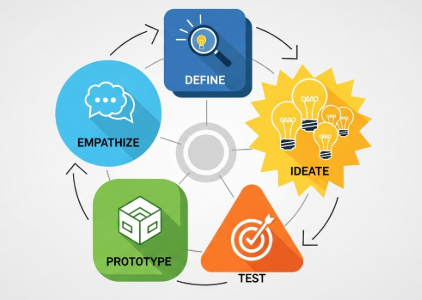
Although UI and UX are often mentioned together, they are not the same. In professional digital product development, each plays a distinct—yet interconnected—role in shaping the experience users have with an application, website, or system.
This article explains the definitions, differences, responsibilities, tools, and examples of UI and UX design in a clear and structured way, following professional and industry-standard references.
1. What Is UX Design?
User Experience (UX) Design focuses on how a product works, how it flows, and how users feel when interacting with it. It covers the entire journey—from the moment a user first discovers the product to the moment they complete a task or exit the experience.
Key Responsibilities of a UX Designer
User research: interviews, surveys, observation, persona creation
Information architecture: structuring content and navigation
User flows: mapping how users complete tasks
Wireframing: creating low-fidelity layouts for testing
Prototyping: building interactive flows for validation
Usability testing: identifying pain points and improving clarity
Product strategy: aligning design decisions with user needs and business goals
A UX designer essentially acts as the bridge between user needs and product functionality.
Core UX Goal:
👉 Make the product logical, useful, and easy to use.
2. What Is UI Design?
User Interface (UI) Design focuses on how a product looks, feels, and interacts visually. It is the layer that users see and touch.
Key Responsibilities of a UI Designer
Visual design: typography, color theory, iconography
Layout and spacing: grid systems, composition, visual hierarchy
Interactive elements: buttons, forms, toggles, sliders
Design systems: component libraries, style guides
Micro-interactions: animations, transitions, feedback messages
Brand translation: ensuring consistency across the interface
UI designers ensure the product’s aesthetic and visual language support the intended UX.
Core UI Goal:
👉 Make the product beautiful, consistent, and intuitive to interact with.
3. The Difference Between UI and UX Design
Although they work closely together, UI and UX have fundamentally different scopes.
| Aspect | UX Design | UI Design |
|---|---|---|
| Focus | Experience & functionality | Visual presentation & interaction |
| Concerned with | User needs, flow, structure | Interface aesthetics & usability |
| Deliverables | Personas, flows, wireframes, prototypes | High-fidelity screens, components, style guides |
| Tools | Figma, Miro, Notion, UserTesting | Figma, Adobe XD, Illustrator |
| Key Question | “Does it work well?” | “Does it look and feel right?” |
| Outcome | Smoother journey | Attractive, consistent interface |
Both roles are essential: A great UI cannot fix a poor UX, and a great UX will be ignored without strong UI execution.
4. Real-World Examples of UI vs UX
Example 1: A Checkout Form
UX: Steps are simplified from 5 to 2. Optional fields removed.
UI: Button is designed with clear contrast and a visual hierarchy highlighting “Checkout Now.”
Example 2: A Food Delivery App
UX: Reduces ordering steps, auto-detects location, and surfaces restaurant recommendations.
UI: Uses consistent colors, appealing imagery, readable fonts, and large touch-friendly buttons.
Example 3: A Travel Booking Website
UX: Filters prioritize user needs (budget, duration, departure time).
UI: Clean layout, clear icons, and easy-to-read date selectors.
UX optimizes the journey, while UI optimizes the interface of that journey.
5. Why People Confuse UI and UX
The main reason: Most users see the interface, not the system beneath it.
To users:
A bad interface feels like “bad UX.”
Poor visual readability feels like “bad design.”
To designers:
UI and UX collaboration is inseparable.
UX informs what must be built, and UI defines how it is visually delivered.
This overlap leads to misconceptions—but ultimately, both roles aim to achieve the same goal:
👉 Create a product that satisfies users and supports business value.
6. Tools Used in UI and UX
Common UX Tools
Figma (low-fi wireframes)
Miro (mapping)
Notion (research organization)
UserTesting (validating concepts)
Axure (advanced prototyping)
Common UI Tools
Figma (high-fidelity UI)
Adobe Illustrator (icons and branding)
After Effects (micro-animations)
Zeplin (handoff)
Tools often overlap—especially in modern design workflows—but usage depth differs.
7. Which Career Path Should You Choose?
Your choice depends on your strengths, personality, and preferred type of problem-solving.
Choose UX If You Are:
Analytical
Curious about human behavior
Good at understanding problems and creating flows
Interested in strategy and research
Comfortable testing and iterating
Choose UI If You Are:
Artistic and visually driven
Interested in layout, typography, and color
Skilled in creating visually pleasing compositions
Detail-oriented (spacings, alignments, sizing)
Passionate about aesthetics and interactions
Choose Both (UI/UX) If You Want To:
Work in startups or small teams
Become a product designer
Manage end-to-end design processes
Create complete prototypes and interaction systems
Full-stack product designers are increasingly in demand, especially in digital-first companies.
8. Final Thoughts
UI and UX design are separate disciplines, but both are essential to building a successful digital product.
UX builds the structure.
UI builds the surface.
Together, they create an experience users trust.
Whether you aim to become a UI specialist, a UX researcher, or a full-stack product designer, mastering both perspectives will make you significantly more effective in the modern design ecosystem.