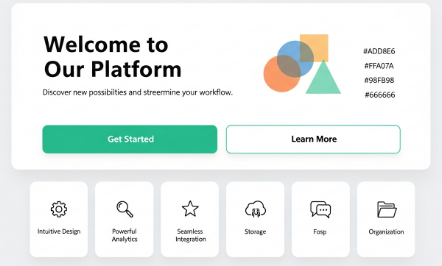
Visual Hierarchy Design Guide for Clear and Effective Interfaces

Visual Hierarchy Design: A Practical Guide for Designers and Businesses

Visual hierarchy design is one of the most important principles in graphic design, UI, and UX. It determines what users notice first, what they read next, and how they take action. Without a clear hierarchy, even a visually attractive design can fail.

From my direct experience working on websites, landing pages, and mobile interfaces, poor visual hierarchy design is a top reason for low engagement. Users feel confused, scan randomly, and leave without converting. On the other hand, when hierarchy is intentional, users move naturally through content.

This guide explains visual hierarchy design in a practical, experience-based way. You will learn principles, real examples, and actionable steps you can apply immediately.


What Is Visual Hierarchy Design?

Visual hierarchy design is the arrangement of elements to guide the viewer’s attention in a deliberate order. It answers a simple question: What should the user see first, second, and third?

Designers control hierarchy using size, contrast, color, spacing, alignment, and position. These signals help users scan content quickly and understand meaning without effort.

In digital products, strong hierarchy improves:

  • Readability

  • Usability

  • Conversion rates

  • User confidence

This principle applies to websites, apps, dashboards, presentations, and even printed materials.


Why Visual Hierarchy Design Matters in UX and UI

Users do not read screens word by word. They scan. According to usability studies, people often decide whether to stay on a page within seconds.

Visual hierarchy design supports fast decision-making. It reduces cognitive load and highlights what matters most.

From real project audits, I often see three problems:

  1. Everything looks equally important

  2. Call-to-action buttons blend into content

  3. Headings fail to stand out from body text

All three issues are hierarchy failures. When fixed, bounce rates often drop, and click-through rates improve.


Core Principles of Visual Hierarchy Design

Size and Scale

Larger elements attract attention first. Headlines should clearly dominate body text.

Practical tip:
Use at least a 1.6–2x size difference between headings and paragraph text.


Color and Contrast

High-contrast elements stand out. Low contrast recedes.

Example:
A bright button on a neutral background naturally becomes the focal point.

Avoid using too many accent colors. One primary action color is usually enough.


Typography and Weight

Font weight signals importance. Bold text draws the eye faster than regular text.

Best practice:

  • Headlines: bold or semi-bold

  • Subheadings: medium

  • Body text: regular

Consistent typography improves scannability.


Spacing and White Space

Spacing creates separation and clarity. Crowded layouts confuse users.

From experience, adding white space often improves clarity more than adding visuals.

White space:

  • Groups related elements

  • Separates unrelated content

  • Improves reading speed


Alignment and Position

Elements placed higher or centered receive more attention.

Users naturally scan from top to bottom and left to right. This behavior aligns with the F-pattern and Z-pattern reading models.


Visual Hierarchy Design Patterns That Work

The F-Pattern

Common on content-heavy pages like blogs and news sites.

Users scan:

  • Top horizontal area

  • Second horizontal area

  • Left vertical line

Place key messages and CTAs along these paths.


The Z-Pattern

Effective for landing pages and simple layouts.

Users scan:

  • Top left to top right

  • Diagonal to bottom left

  • Bottom left to bottom right

This pattern works well for promotional pages.


Step-by-Step Process to Apply Visual Hierarchy Design

Step 1: Define the Primary Goal

Every screen must have one main goal.

Examples:

  • Sign up

  • Read an article

  • Buy a product

Everything else should support that goal.


Step 2: Rank Content by Importance

List elements in order of priority:

  1. Primary message

  2. Supporting information

  3. Secondary actions

This ranking becomes the foundation of your hierarchy.


Step 3: Assign Visual Weight

Use visual tools intentionally:

  • Size for importance

  • Color for action

  • Space for grouping

Avoid random emphasis. Every highlight must have a reason.


Step 4: Test With Real Users

Ask users to answer one question:
“What do you notice first?”

If the answer is wrong, adjust the hierarchy.


Mini Case Study: Landing Page Conversion Fix

A SaaS landing page I reviewed had low conversions. The problem was visual hierarchy design.

Issues found:

  • Headline and subheadline looked similar

  • CTA button color matched background

  • Feature list dominated the layout

Changes made:

  • Increased headline size by 40%

  • Changed CTA to a high-contrast color

  • Reduced feature list visual weight

Result:
Conversion rate increased by 27% within three weeks.

This outcome confirms how powerful hierarchy adjustments can be.


Common Visual Hierarchy Design Mistakes

Even experienced designers make these errors:

  • Using too many focal points

  • Overusing bold text

  • Ignoring mobile hierarchy

  • Relying only on color for emphasis

Accessibility matters. Always ensure hierarchy works without color alone.


Visual Hierarchy Design for Mobile Interfaces

Mobile screens demand stricter hierarchy.

Key considerations:

  • Smaller screens require stronger contrast

  • Touch targets must stand out clearly

  • Vertical spacing becomes more important

From mobile UX audits, simplifying hierarchy often improves usability more than adding features.


Visual Hierarchy Design and Accessibility

Good hierarchy supports accessibility.

Use:

  • Clear heading levels

  • Sufficient contrast ratios

  • Logical reading order

According to the W3C Web Content Accessibility Guidelines, clear structure improves access for screen readers and cognitive accessibility.
Authoritative reference: https://www.w3.org/WAI/standards-guidelines/wcag/


Key Takeaways

Visual Hierarchy Design Essentials:

  • Decide what matters most first

  • Use size, contrast, and spacing intentionally

  • Limit visual competition

  • Test hierarchy with real users

  • Optimize for mobile and accessibility

Strong hierarchy turns design into communication, not decoration.


Frequently Asked Questions

What is the main goal of visual hierarchy design?

To guide user attention in a clear and intentional order.

How many focal points should a page have?

One primary focal point. Secondary elements should support it.

Does visual hierarchy design affect SEO?

Indirectly, yes. Better UX improves engagement and dwell time.

Can visual hierarchy design improve conversions?

Yes. Clear hierarchy reduces friction and improves decision-making.


Conclusion

Visual hierarchy design is not subjective decoration. It is a strategic tool built on user behavior and real-world testing. Designers who master hierarchy create interfaces that feel intuitive, clear, and effective.

When visual hierarchy design aligns with goals, users move confidently from attention to action. That clarity is what separates good design from great design.