How Designers Actually Improve Graphic Design Skills Over Time
Graphic design is a practical skill that improves through structured learning and consistent practice. Many beginners feel stuck after learning basic tools. This article explains how to improve graphic design skills using real-world methods that professionals apply every day.
I have worked with freelance designers, agencies, and in-house teams for years. The most successful designers follow systems, not shortcuts. They practice deliberately, study strong work, and seek feedback continuously. This guide breaks down those proven approaches into clear and actionable steps.
Why Improving Graphic Design Skills Requires a System
Talent alone is not enough in professional design. Skill growth happens when learning is intentional and measured.
Many designers repeat the same habits for years. As a result, progress slows. Improvement requires reflection, experimentation, and evaluation.
Professional designers usually share three habits:
They study design fundamentals regularly
They practice with purpose, not randomly
They review their work critically
Understanding how to improve graphic design skills starts with building a repeatable system.
Master the Core Design Fundamentals First
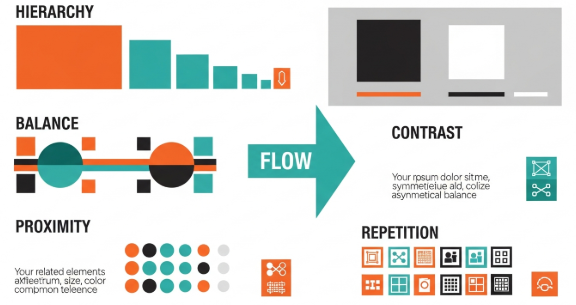
Strong fundamentals separate amateurs from professionals. Software skills help, but fundamentals guide every design decision.
Key Fundamentals You Must Understand
Typography hierarchy and spacing
Color theory and contrast
Layout, alignment, and grids
Visual balance and white space
For example, I once reviewed a logo redesign project that failed. The idea was strong, but poor spacing ruined readability. After fixing alignment and kerning, the same concept became effective.
Before learning trends, reinforce these basics. They improve every project immediately.
Practice With Real Design Constraints
Random practice helps less than structured challenges. Professional growth happens when you simulate real projects.
Examples of Effective Practice
Redesign an existing website homepage
Create a logo for a fictional brand
Design social media ads with clear goals
When you practice with constraints, decision-making improves. You stop decorating and start solving problems.
This approach accelerates how to improve graphic design skills in realistic scenarios.
Learn to Analyze Great Design Work
Designers improve faster when they analyze quality work instead of copying it.
How to Analyze Design Effectively
Ask clear questions:
Why does this layout feel balanced?
How does typography guide the eye?
What problem does this design solve?
Break designs into components. Study spacing, color usage, and hierarchy.
A helpful resource is the AIGA Eye on Design archive, which showcases professional work and design thinking:
https://www.aiga.org/resources
Analyzing design sharpens judgment and visual literacy.
Use Feedback to Improve Faster
Designers who seek feedback progress faster than those who work alone. Feedback reveals blind spots.
Where to Get Quality Feedback
Design communities and forums
Mentors or senior designers
Real clients and users
Early in my career, a senior designer pointed out my overuse of effects. That feedback changed my approach permanently.
If you want to learn how to improve graphic design skills, feedback is non-negotiable.
Build Projects That Solve Real Problems
Strong portfolios focus on problem-solving, not decoration.
What Clients and Employers Look For
Clear design objectives
Logical design decisions
Measurable results
For example, one junior designer redesigned an e-commerce product page. Sales improved by 12% due to better hierarchy and calls to action. That project helped them land a full-time role.
Real outcomes demonstrate growth and credibility.
Improve Graphic Design Skills Through Consistent Learning
Design evolves constantly. Professionals commit to continuous education.
Effective Learning Methods
Design books and case studies
Online courses with assignments
Design critiques and breakdowns
Avoid passive learning. Apply every lesson immediately. Small improvements compound over time.
Consistent learning supports long-term mastery and confidence.
Strengthen Visual Thinking and Concept Development
Good design starts with ideas, not tools.
Before opening software, sketch concepts. Explore multiple directions. This habit improves originality.
Concept Development Techniques
Mind mapping
Thumbnail sketching
Word association
Designers who think visually create stronger and clearer solutions.
This step is often overlooked, yet it is essential for anyone learning how to improve graphic design skills professionally.
Measure Progress With Clear Benchmarks
Improvement feels vague without benchmarks. Professionals track growth intentionally.
Ways to Measure Progress
Compare older and newer projects
Track client feedback
Review speed and confidence
When designers see progress, motivation increases. Structured reflection reinforces learning.
Common Mistakes That Slow Skill Growth
Many designers struggle because of repeated errors.
Mistakes to Avoid
Chasing trends without understanding fundamentals
Overusing effects and tools
Avoiding critique
Growth accelerates when mistakes are identified early and corrected deliberately.
Key Takeaways
How to Improve Graphic Design Skills Effectively
Master design fundamentals first
Practice with real constraints
Analyze professional work critically
Seek feedback consistently
Focus on problem-solving, not decoration
Skill improvement is a process, not an event.
Frequently Asked Questions
How long does it take to improve graphic design skills?
Progress varies, but noticeable improvement usually appears within three to six months of focused practice.
Do I need formal education to become better at design?
No. Many professionals are self-taught. Structured learning and feedback matter more.
How often should I practice design?
Short daily sessions are more effective than long, infrequent sessions.
Should beginners focus on tools or concepts?
Concepts and fundamentals should come first. Tools support ideas.
Conclusion
Learning how to improve graphic design skills requires patience, structure, and honesty about weaknesses. Designers who master fundamentals, practice deliberately, and seek feedback consistently achieve sustainable growth. Over time, skills compound into confidence, credibility, and professional success.
Improvement is not about talent alone. It is about commitment to better thinking and better execution.