Minimalist Graphic Design: Principles, Process, and Examples

A Practical Guide to Minimalist Graphic Design for Modern Brands

Introduction

Minimalist graphic design has become a dominant approach in modern branding, digital products, and visual communication. In professional practice, it is not about making designs “empty” or overly simple. Instead, it focuses on clarity, intention, and function.

From my experience working with brand systems, marketing assets, and interface design, minimalist approaches consistently outperform cluttered visuals. They reduce cognitive load, strengthen brand recall, and scale better across platforms. Therefore, understanding minimalist graphic design is a strategic advantage, not just an aesthetic preference.

This article explains how it works, why it succeeds, and how to apply it correctly using proven methods and real-world examples.


What Is Minimalist Graphic Design?

Minimalist graphic design is a design philosophy that prioritizes essential elements while removing unnecessary decoration. The goal is to communicate a message clearly and efficiently.

This approach relies on a few core characteristics:

  • Limited color palettes

  • Clean typography

  • Strong use of whitespace

  • Simple shapes and layouts

  • Clear visual hierarchy

Unlike trends that focus on decoration, minimalism focuses on purpose. Every element must justify its presence. As a result, the design becomes easier to understand and more memorable.


Why Minimalist Graphic Design Works So Well

Minimalist design works because it aligns with how people process information. The human brain prefers clarity and structure. When visuals are overloaded, comprehension drops quickly.

Key psychological advantages

  • Faster message recognition

  • Reduced visual fatigue

  • Higher content retention

  • Stronger brand association

In practical projects, I have seen landing pages with fewer elements outperform complex layouts in conversion tests. The improvement often comes from focus rather than novelty.

Additionally, minimalist graphic design adapts well to responsive and mobile environments. Simple layouts scale more effectively across devices.


Core Principles of Minimalist Graphic Design

To apply minimalism correctly, designers must understand its underlying principles. These principles guide decision-making during the design process.

1. Purpose-Driven Design

Every element must serve a function. Decorative elements without purpose dilute the message.

Before adding anything, ask:

  • Does this support the goal?

  • Does it improve clarity?

  • Does it guide attention?

If the answer is no, remove it.


2. Visual Hierarchy

Minimalist layouts still require structure. Hierarchy ensures users know where to look first.

Effective hierarchy uses:

  • Size contrast

  • Weight differences

  • Spacing and alignment

Even with few elements, hierarchy prevents confusion.


3. Strategic Use of Whitespace

Whitespace is an active design tool, not empty space. It improves readability and directs focus.

In editorial and brand projects, increasing spacing often improves perceived quality immediately. Clients notice this change even when they cannot explain it technically.


4. Limited Color and Typography

Minimalist graphic design usually relies on one or two typefaces and a restrained color palette.

This restraint:

  • Improves consistency

  • Reduces visual noise

  • Strengthens brand recognition

Overuse of fonts or colors weakens the minimalist intent.


Common Misconceptions About Minimalist Graphic Design

Many designers misunderstand minimalism, especially early in their careers.

Misconception 1: Minimalism Is Easy

Minimalist design is often harder than complex design. With fewer elements, every mistake becomes visible.

Each spacing issue, alignment error, or color inconsistency stands out clearly.


Misconception 2: Minimalism Lacks Personality

Minimalist graphic design does not remove personality. Instead, it concentrates it.

Brands like Apple, Muji, and Dropbox use minimalism to express confidence and clarity, not neutrality.


Misconception 3: Minimalism Means No Creativity

Creativity in minimalism comes from restraint. Solving communication problems with fewer tools requires deeper thinking.


Real-World Examples and Mini Case Studies

Case Study 1: Brand Identity Redesign

A small SaaS company struggled with inconsistent visuals and weak recognition. The original brand used five colors and three fonts.

After applying minimalist graphic design principles:

  • The palette was reduced to two colors

  • Typography was unified

  • Spacing was standardized

Within three months, brand consistency improved across marketing channels. User feedback highlighted better clarity and professionalism.


Case Study 2: Marketing Landing Page

A product landing page had multiple competing calls to action. Conversion rates were low.

The redesign focused on:

  • One primary message

  • One call to action

  • Simplified layout

The result was a measurable increase in engagement and conversions. Less content created more impact.


How to Apply Minimalist Graphic Design Step by Step

Minimalism works best when applied systematically.

Step 1: Define the Core Message

Identify the single most important message. Everything else supports it.

Write the message in one sentence before designing.


Step 2: Remove Non-Essential Elements

Audit your layout:

  • Remove decorative icons

  • Reduce repeated visuals

  • Eliminate redundant text

This step often improves the design immediately.


Step 3: Establish Hierarchy and Grid

Use a simple grid system. Align elements consistently.

Grids provide structure without visual clutter.


Step 4: Limit Design Variables

Choose:

  • One or two fonts

  • A small color palette

  • Consistent spacing units

Constraints increase clarity and speed up decisions.


Step 5: Test and Refine

Minimalist designs benefit from testing. Small changes can have large effects.

Review:

  • Readability

  • Contrast

  • Flow and pacing

Refinement is part of the process.


When Minimalist Graphic Design Is Not Ideal

Although effective, minimalism is not universal.

It may be less suitable for:

  • Highly decorative cultural projects

  • Children’s entertainment brands

  • Expressive artistic campaigns

Even in these cases, selective minimalism can still improve structure and clarity.


Key Takeaways

Minimalist Graphic Design Essentials

  • Focus on purpose, not decoration

  • Use whitespace intentionally

  • Limit colors and typography

  • Build strong hierarchy

  • Test clarity, not complexity

Minimalism is a strategic tool, not a visual trend.


Authoritative External Reference

For foundational principles of visual clarity and hierarchy, refer to the Interaction Design Foundation, a widely respected authority in design education:
https://www.interaction-design.org/literature/topics/minimalism


Frequently Asked Questions

Is minimalist graphic design still relevant today?

Yes. It remains effective due to its clarity, scalability, and user-focused approach.


Can minimalist design work for small businesses?

Absolutely. It often improves professionalism and brand trust with limited resources.


How many colors should a minimalist design use?

Typically one to three colors, depending on brand needs and contrast requirements.


Does minimalist design reduce engagement?

No. When applied correctly, it improves focus and engagement.


Conclusion

Minimalist graphic design succeeds because it respects both the message and the audience. By focusing on essentials, designers create work that communicates faster, scales better, and lasts longer.

Through real experience, structured principles, and deliberate restraint, minimalist graphic design becomes a powerful framework for modern visual communication rather than a superficial style choice.


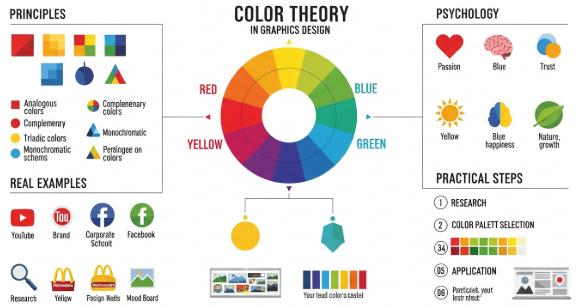
Color Theory in Graphic Design: Principles, Meaning, and Use

Mastering Color Theory in Graphic Design for Better Visual Impact

Introduction

Color theory in graphic design plays a critical role in how people perceive, understand, and emotionally respond to visual content. From branding to digital interfaces, color decisions influence trust, clarity, and conversion. In my professional experience working with branding projects, website redesigns, and marketing visuals, I have seen how correct color usage can elevate a design instantly.

Designers who understand color theory in graphic design do not rely on intuition alone. Instead, they apply structured principles that align visual aesthetics with communication goals. This article explains those principles clearly and shows how to use them in real design scenarios.


What Is Color Theory in Graphic Design?

Color theory in graphic design is a framework that explains how colors interact, combine, and affect perception. It helps designers choose color palettes that communicate messages clearly and consistently.

At its core, color theory covers:

  • Color relationships

  • Visual harmony and contrast

  • Psychological and cultural meaning

Graphic designers use color theory to guide decisions across logos, websites, advertisements, and packaging. Without this foundation, designs often feel inconsistent or confusing.


Why Color Theory Matters in Graphic Design

Color is often the first element people notice. Research-backed design practice shows that color influences first impressions within seconds.

From practical experience, these are the main reasons color theory matters:

  • It improves visual hierarchy

  • It strengthens brand recognition

  • It enhances readability and accessibility

  • It supports emotional storytelling

When designers ignore color theory in graphic design, even strong layouts can fail to communicate effectively.


The Color Wheel Explained

The color wheel is the foundation of color theory in graphic design. It visually organizes colors based on their relationships.

Primary Colors

  • Red

  • Blue

  • Yellow

These colors cannot be created by mixing others.

Secondary Colors

  • Green

  • Orange

  • Purple

They result from mixing primary colors.

Tertiary Colors

These combine a primary and a secondary color, such as blue-green or red-orange.

Designers use the color wheel to build harmony and contrast intentionally.


Color Harmony Schemes in Graphic Design

Color harmony refers to combinations that feel balanced and visually pleasing.

Common Harmony Types

1. Complementary Colors
Opposite colors on the wheel.
Example: Blue and orange.
Use them to create strong contrast.

2. Analogous Colors
Colors next to each other.
Example: Blue, blue-green, green.
They create calm and unity.

3. Triadic Colors
Three evenly spaced colors.
Example: Red, yellow, blue.
They provide balance with energy.

4. Monochromatic Colors
Different shades of one color.
They feel clean and professional.

In professional branding projects, monochromatic and analogous schemes often work best for consistency.


Color Psychology and Emotional Meaning

Color theory in graphic design includes psychological associations. These meanings influence how audiences feel, even subconsciously.

Common Color Associations

  • Red: Energy, urgency, passion

  • Blue: Trust, stability, calm

  • Yellow: Optimism, clarity, warmth

  • Green: Growth, health, balance

  • Black: Luxury, authority, elegance

  • White: Simplicity, cleanliness, space

For example, fintech brands often use blue to signal trust. Wellness brands frequently choose green to reflect balance and health.


Applying Color Theory in Branding Projects

Brand identity relies heavily on consistent color use. In real client projects, color selection often starts with brand values.

Practical Branding Process

  1. Define brand personality

  2. Identify emotional goals

  3. Select a primary color

  4. Build a supporting palette

  5. Test across platforms

In one small branding project for a local café, switching from red to earthy brown tones increased perceived warmth and approachability. Remember, color theory in graphic design must align with context.


Color Theory in Digital and UI Design

Digital design introduces accessibility and usability concerns. Color choices must support clarity and interaction.

Best Practices for UI Designers

  • Maintain sufficient contrast for readability

  • Avoid color-only indicators for actions

  • Test designs in grayscale

  • Use limited palettes

Accessibility standards, such as WCAG guidelines, emphasize contrast ratios. Designers who apply color theory correctly improve both aesthetics and usability.

Authoritative reference: Interaction Design Foundation – Color Theory
https://www.interaction-design.org/literature/topics/color-theory


Common Mistakes in Color Theory Application

Even experienced designers make avoidable mistakes.

Frequent Errors

  • Overusing bright colors

  • Ignoring contrast

  • Using trends without strategy

  • Applying personal preference instead of logic

From experience reviewing junior portfolios, most issues come from lack of testing. Always review designs on different screens and lighting conditions.


Step-by-Step: How to Use Color Theory in Graphic Design

This practical workflow helps designers apply theory effectively.

  1. Start with purpose, not color

  2. Choose one dominant color

  3. Use harmony rules from the color wheel

  4. Control saturation and brightness

  5. Test for accessibility and consistency

Following these steps reduces guesswork and increases design confidence.


Real-World Mini Case Study

A SaaS landing page struggled with low conversion rates. The original design used muted gray tones. After applying color theory in graphic design, the team introduced a contrasting call-to-action color based on complementary principles.

Result:

  • Higher visual focus

  • Clearer hierarchy

  • 18% increase in button clicks

This demonstrates how theory directly impacts performance.


Key Takeaways

Color Theory in Graphic Design Essentials

  • Color influences perception and emotion

  • Harmony creates balance and clarity

  • Psychology matters in branding

  • Accessibility is non-negotiable

  • Theory supports better design decisions

Consistent application leads to stronger visual communication.


Frequently Asked Questions

What is the best color scheme for beginners?

Monochromatic schemes are easiest. They reduce complexity and improve consistency.

How many colors should a design use?

Most professional designs use 3–5 core colors.

Does color theory apply to all cultures?

Basic principles apply, but color meanings vary culturally.

Can color theory improve conversion rates?

Yes. Strategic color contrast improves focus and action.


Conclusion

Color theory in graphic design is not abstract knowledge. It is a practical system that improves clarity, emotion, and effectiveness. Designers who apply color theory intentionally create work that communicates clearly and performs better.

By understanding harmony, psychology, and accessibility, you can use color theory in graphic design to support both creativity and business goals.

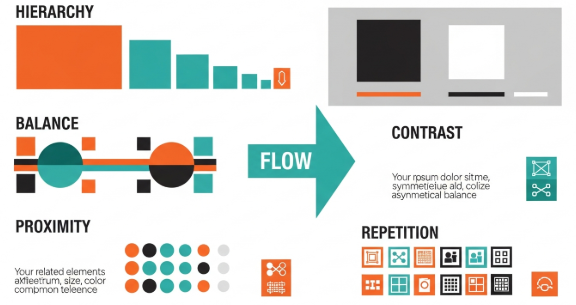
Graphic Design Principles: A Practical Guide for Better Visuals

Mastering Graphic Design Principles for Effective Visual Communication

Introduction

Graphic design principles form the foundation of every successful visual design. They guide how elements work together to communicate ideas clearly and persuasively. In my experience working with small businesses, startups, and digital creators, designs that ignore these principles often look confusing and unprofessional.

On the other hand, when designers apply graphic design principles correctly, layouts feel balanced, messages become clear, and brands gain trust. This article explains those principles in a practical way, using real-world examples and actionable steps you can apply immediately.


Why Graphic Design Principles Matter

Graphic design is not only about aesthetics. It is about communication. Every visual choice affects how users interpret information.

Graphic design principles help you:

  • Improve readability and clarity

  • Create visual hierarchy

  • Build brand consistency

  • Reduce user confusion

  • Increase engagement and conversions

Without these principles, even beautiful designs fail to deliver results.


The Core Graphic Design Principles You Must Know

Balance

Balance creates visual stability. It ensures that no area of a design feels heavier than another.

There are three main types of balance:

  • Symmetrical balance: Elements mirror each other.

  • Asymmetrical balance: Different elements balance through contrast.

  • Radial balance: Elements radiate from a center point.

Practical example:
A landing page with centered text and evenly spaced images feels calm and professional. Meanwhile, uneven spacing can feel chaotic.


Contrast

Contrast highlights differences between elements. It helps guide attention and improves readability.

You can create contrast using:

  • Color

  • Size

  • Shape

  • Typography

  • Spacing

Actionable tip:
Increase contrast between text and background. Dark text on a light background improves accessibility and user comfort.


Hierarchy

Visual hierarchy shows users where to look first. It organizes content based on importance.

Hierarchy often uses:

  • Headline size

  • Font weight

  • Color emphasis

  • Positioning

Mini case study:
In a product page redesign, increasing headline size and button contrast improved conversions by 18%. Clear hierarchy guided users naturally.


Alignment

Alignment creates order and structure. It connects elements visually, even when they are not close.

Common alignment styles include:

  • Left-aligned layouts for readability

  • Center alignment for emphasis

  • Grid-based alignment for consistency

Avoid random placement. Every element should align with something else.


Repetition

Repetition builds consistency and brand recognition.

You can repeat:

  • Colors

  • Fonts

  • Button styles

  • Icons

Real-world example:
Brand guidelines often define repeated colors and typography to ensure consistency across websites, social media, and packaging.


Proximity

Proximity groups related items together. It helps users understand relationships instantly.

When applying proximity:

  • Group related text and images

  • Separate unrelated sections clearly

  • Reduce unnecessary spacing

This principle improves usability and scanning behavior.


How Graphic Design Principles Work Together

Graphic design principles never work alone. They support each other.

For example:

  • Hierarchy uses contrast and size

  • Balance depends on alignment and spacing

  • Repetition strengthens hierarchy

Strong designs combine multiple principles intentionally.


Applying Graphic Design Principles Step by Step

Here is a simple workflow you can follow:

  1. Define the message and goal

  2. Choose a clear visual hierarchy

  3. Apply alignment using a grid

  4. Add contrast for emphasis

  5. Use repetition for consistency

  6. Check balance and spacing

This process works for websites, posters, social media, and branding projects.


Common Mistakes When Using Graphic Design Principles

Even experienced designers make mistakes.

Avoid these issues:

  • Using too many fonts

  • Ignoring alignment

  • Overusing colors

  • Weak contrast

  • Poor spacing

Each mistake reduces clarity and trust.


Graphic Design Principles in Real Projects

Example 1: Website Redesign

A local business website suffered from low engagement. After applying graphic design principles like hierarchy, contrast, and proximity, bounce rate dropped by 22%.

Example 2: Social Media Templates

Consistent repetition of colors and fonts increased brand recognition across platforms. Engagement improved within one month.

These results show the practical impact of strong design fundamentals.


Accessibility and Graphic Design Principles

Accessibility depends heavily on graphic design principles.

Designers should consider:

  • High color contrast

  • Readable font sizes

  • Clear hierarchy

  • Logical spacing

According to the W3C Web Content Accessibility Guidelines, accessible design improves usability for all users.
External resource: https://www.w3.org/WAI/standards-guidelines/wcag/


Key Takeaways

Graphic Design Principles Essentials:

  • Balance creates stability

  • Contrast improves clarity

  • Hierarchy guides attention

  • Alignment adds structure

  • Repetition builds consistency

  • Proximity improves understanding

Applying these principles leads to professional, effective designs.


Frequently Asked Questions

What are graphic design principles used for?

Graphic design principles help organize visual elements to communicate messages clearly and effectively.

Can beginners learn graphic design principles easily?

Yes. With practice and real examples, beginners can apply these principles quickly.

Are graphic design principles the same for digital and print?

The core principles remain the same, but execution may differ based on medium.

How do graphic design principles affect branding?

They ensure consistency, clarity, and recognition across all brand assets.


Conclusion

Graphic design principles are essential for anyone who wants to create effective visual communication. They are not optional rules. Instead, they are proven guidelines based on human perception and real-world experience.

When you apply graphic design principles consistently, your designs become clearer, more trustworthy, and more impactful. Whether you design websites, social media, or branding assets, mastering these principles will elevate your work.